Showing posts with label GPRS TRICKS. Show all posts

Friday, March 30, 2012

Free gprs and downloads.


Hi friends this is new trick for airtel free gprs for 2012 and is really working at great speed as well. try the following steps and enjoy free gprs and downloads.
1.Make The New Settings!
APN: Airtelgprs.com
IP: 75.68.49.100 Port: 80
HP: 0.facebook.com 100% working!


2.Hello friends i m sharing my best trick to all of u..u can download above 500mb file without stop..


Apn=airtelgprs.com
Hp=0.facebook.com
Port=80
Proxy address=hiddenaliens.com
Now open ur homepage.. This is 100% working all over india…
Note:-First Clear Cache From Your Browser


3.Airtel Hispeed Gprs Tricks 2012
1St Of All Connect Ur Phone With airtelgprs.com Then Open Below Link No Need To Set Anything Just Enjoy I Recommend To use Opera Mini11 (or) Firefox in PC Because its faster And For Mobile Use Default Mobile Office Setting 4 More Info Comment Here…
http://122.170.122.191.nation4india.appspot.com/www.Google.Com
4.Airtel Hispeed Gprs Tricks


Hi Frends Just Make
HP: 0.facebook.com
Port: 80 Proxy: dephyr.com (or) letmethruthis.com (or) vectroproxy.com
And Go To Home Page Download Any Big File Hispeed.


5.Airtel Mobile Office Tricks 2012


Just open that URL in Ur browser or make it as Ur Home Page


http://0.Facebook.com.T9space.com http://100.1.200.188.T9space.comhttp://122.170.122.191.T9space.com http://122.170.122.214.T9space.com


6.Airtel Big File Downloads
APN:- airtelgprs.com
Proxy IP:- crossproxy.com
Port:- 80
Home Page:- 0.facebook.com
Enjoy Free Big Files Downloading With Hi speed.


Tuesday, March 27, 2012

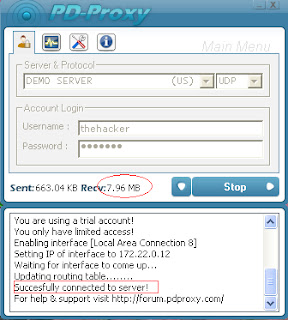
Airtel working PD PROXY VPN trick for PC

Airtel working PD PROXY VPN trick for PC.This Airtel Vpn Trick is 100% Working all
over India And also tested by me .It Gives good speed Guaranteed.
1
Follow the steps:-
-First Download PD PROXY


http://www.filesonic.in/file/4262187415
or Download from the website its the same.
http://www.pdproxy.com/ download.html(BEST OPTION)
-Extract the file to the location where you can locate it easily
2
-Now Go To
http://www.pdproxy.com/signup.htm
and Sign up for a new Account, confirm the account by visiting your email inbox and Copy the username and password provided by them.If you are using windows xp,vista then you will have to download Microsoft .Net framework
LINK: http://filehippo.com/download_dotnet_framework_4/
windows7 users need not install this all .
-After All Run Pd Proxy.exe on the
extracted file
-Enter username and password.
-Select Server as: Demo sever and
Port as:UDP
3
-Goto settings and Goto Advanced settings Tab
-Set UDP Server as:53
4
-Enable parent proxy
5
-Click on connect
NOTE:Keep Balance Below 10 paise before using this trick.
(Befor clicking on connect ensure you have connected your phone to pc via usb or
bluetooth)

6
Features:-
Works without disconnection
Speed tested by me daytime 100kbps
+(7mb modem)

I Hope You Enjoy This Airtel Working VPN Trick For Pc..

Monday, March 26, 2012

Airtel Free GPRS & Free Downloading Tricks 2012

Hi friends this is new trick for airtel free gprs for 2012 and is really working at great speed as well. try the following steps and enjoy free gprs and downloads.
1.Make The New Settings!
APN: Airtelgprs.com

IP: 75.68.49.100 Port: 80
HP: 0.facebook.com 100% working!

2.Hello friends i m sharing my best trick to all of u..u can download above 500mb file without stop..
Apn=airtelgprs.com
Hp=0.facebook.com
Port=80
Proxy address=hiddenaliens.com
Now open ur homepage.. This is 100% working all over india…
Note:-First Clear Cache From Your Browser
3.Airtel Hispeed Gprs Tricks 2012
1St Of All Connect Ur Phone With airtelgprs.com Then Open Below Link No Need To Set Anything Just Enjoy I Recommend To use Opera Mini11 (or) Firefox in PC Because its faster And For Mobile Use Default Mobile Office Setting 4 More Info Comment Here…
http://122.170.122.191.nation4india.appspot.com/www.Google.Com
4.Airtel Hispeed Gprs Tricks
Hi Frends Just Make
HP: 0.facebook.com
Port: 80 Proxy: dephyr.com (or) letmethruthis.com (or) vectroproxy.com
And Go To Home Page Download Any Big File Hispeed.
5.Airtel Mobile Office Tricks 2012
Just open that URL in Ur browser or make it as Ur Home Page
http://0.Facebook.com.T9space.com http://100.1.200.188.T9space.com
http://122.170.122.191.T9space.com http://122.170.122.214.T9space.com
6.Airtel Big File Downloads
APN:- airtelgprs.com
Proxy IP:- crossproxy.com
Port:- 80
Home Page:- 0.facebook.com
Enjoy Free Big Files Downloading With Hi speed.
7.New Java Games Download

FREE GPRS ON BSNL MOBILE

1. Create 2 connections with different name like ''BSNL Portal'' and ''CELLONE Portal'' with following configuration 
Access point name- ''celloneportal'' 
Proxy service Address- ''192.168.51.163''  


Proxy port- ''8080''   

Security- 'Normal' 
Rest fields to be as it is 
2. Now open phones default input browse and select any of the 2 configuration created to access the web. You will now access only bsnl home site.   

3. Now keep browser working and open another browser for full internet accss like opera or netfront. In these browsers. Use the 2nd configuration this time connect to open a page you get an error message like '' ACCESS DENIED '' but you dont worry.   

4. Keep both browsers working in background and open connection manager just disconnect the connection that is not working like the 2nd one you used to connect OPERA or NETFRONT.   

5. Again open opera or netfornt from background that you are using to connect with default inbuilt browser to connect to internet   

6. Sure this time you are connected with full access   

Enjoy and have fun for FREE 

FREE AIRTEL GPRS


REQUIREMENTS-3G ENABLED PHONE SUPPORTING SIS FILES (OR HAVING OPERA) AND AIRTEL LIVE ACTIVATED AND THE MOST IMPORTANT IS UR LUCK ,FIRST OF ALL OPEN AIRTEL LIVE HOMEPAGE IN UR PHONES DEFAULT BROWSER.NOW OPEN OPEN
OPERA AND OPEN (wap.mauj.com), REMEMBER ITS wap.mauj.com AND NOT www.mauj.com OTHERWISE UR BALANCE WILL BE DEDUCTED.AND NOT LET UR DEFAULT BROWSER TO BE CLOSED.NOW OPEN UR DEFAULT BROWSER WITH AIRTEL LIVE HOMEPAGE.NOW U CAN OPEN ANY SITE AND USE IT FREE OF COST.JUST ENJOY!


FREE SITES OPEN IN AIRTEL LIVE

List of sites open with AirTel Live- 
http://in.wap.yahoo. com http://mobile.rediff .com http://wap.setindia. com http://wap.indiatime s.com http://wap.indiafm.c om http://wap.phoneytun es.com http://wap.hungama.c om

http://wap.mauj.com http://wap.frenzo.co .in http://www.migtell.c om http://wap.handygo.c om http://wap.onyx3366. com 

Airtel Free Gprs Browsing settings Trick

airtel gprs settings
Below is the free gprs settings for airtel in the year 2011.This is shared to mobilewix.com by  reader Midhun as a part of this contest Free Recharge contest for indian mobile users.He has shared the below airtel manual gprs settings and confirmed its working.So hope it is going out to be a great treat for indian airtel mobile gprs users.You have to configure the below on your mobilegprs settings and save it to use free gprs on airtel mobile.

Airtel Free Gprs settings:

homepage: www.google.com
username: blank
password: blank
use prffd access point: no
proxy; enabled
proxy address:100.1.200.99
port: 8080
apn: airtelgprs.com
So,we have not yet confirmed the working of this airtel mobile office trick shared by Midhun.We need our users all over india to check if it is working and reply with your comments here.If it is working please make a comment it is working or otherwise say it is not working in your state.
This will help us select/deselect Midhun for the free 100 rs  recharge contest.

Friday, March 23, 2012

GPRS SETTINGS FOR ALL NETWORKS IN INDIA

Airtel Live Settings

Account Name – Airtel_live
Homepage –
Username – Blank
Password – Blank
Proxy – Enabled/yes
Proxy and Server Adress – 100.1.200.99
Accespoint Name – airtelfun.com
Proxy and Server Port – 8080
Data bearer – GPRS/ Packet Data
Authentication Type – Normal

Mobile Office Settings


Account Name – MO
Homepage – http://wap.google.com
Username – Blank
Password – Blank
Proxy – disabled/no
Accespoint Name – airtelgprs.com
Proxy and Server Port – 8080
Data bearer – GPRS/ Packet Data
Authentication Type – Normal

Manual Gprs Setting of Bsnl


Manual Gprs Settings For bsnlnet


Account Name – bsnlnet
Username – Blank
Password – Blank
Homepage – http://wap.google.com
Proxy – Disabled / No
Databearer – GPRS / Packetdata
Acces Point Name – bsnlnet
Proxy – Enabled/yes
Authentication Type – Normal

Manual Gprs Settings For bsnllive


Account Name – bsnllive
Username – Blank
Password – Blank
Homepage – http://www.bsnllive.in
Proxy – Disabled / No
Databearer – GPRS / Packetdata
Acces Point Name – bsnllive
Proxy – Enabled/yes
Authentication Type – Normal

Manual Gprs Setting For Idea

Idea Internet Settings

Account Name – Ideainternet
Username – Blank
Password – Blank
Homepage – http://wap.google.com
Proxy – Disabled / No
Databearer – GPRS / Packetdata
Acces Point Name – internet
Proxy – Enabled/yes
Authentication Type – Normal

Manual Gprs Setting of Docomo

Docomo Dive in Manual Gprs Setting


Account Name – DocomDive
Username – Blank
Password – Blank
Homepage –
Proxy and Server Port – 8080
Proxy and Server adress – 10.124.94.7
Databearer – GPRS / Packetdata
Acces Point Name – TATA.DOCOMO.DIVE.IN
Proxy – Enabled/yes
Authentication Type – Normal

Docomo Internet Manual Gprs Setting


Account Name – DocomNet
Username – Blank
Password – Blank
Homepage – http://wap.google.com
Proxy – Disabled / No
Databearer – GPRS / Packetdata
Acces Point Name – TATA.DOCOMO.INTERNET
Proxy – Enabled/yes
Authentication Type – Normal

Docomo  Mms Manual Gprs Setting


Account Name – DocomoMMS
Username – Blank
Password – Blank
Access point- TATA.DOCOMO.MMS
home page - http://mmsc/
Proxy – Enabled / Yes
proxy server - 10.124.26.94
port- 8799
Databearer – GPRS / Packetdata
Proxy – Enabled/yes
Authentication Type – Normal

Videocon manual gprs settings


Videocon manual gprs settings


Account Name –Videocon
Username – Blank
Password – Blank
Homepage – http://wap.google.com
Proxy – Disabled / No
Databearer – GPRS / Packetdata
Acces Point Name –vinternet.com
Proxy – Enabled/yes
Authentication Type – Normal

AIRTEL USERS DOWNLOAD 20000 VIDEOS FOR FREE USING AIRTEL LIVE


Hello friends here is very cool downloading trick for free for Airtel users. All Airtel users can download up to 20,000 videos at free of cost.
 Just go to

http://wap.jamango.in
 here change the id to 1,2,3………20000.
Use Airtel live apn. 
( make sure your balance is below 30p )
  Enjoy!!!

AIRTEL FREE 3G NEW PROXY FOR HANDLER APPLICATIONS


Hi friends,
Here I sharing here a blasting proxy for using handler application and default browser. It works on 2g and 3g both. 
first download this UCWEB Handler or other handler application from here.


then create new connection setting:

APN=airtelgprs.com
PROXY=64.72.103.89
PORT=80
and now in Handler application Enter this front query:
fb.me/cgi-bin/nph-proxy.cgi/000001A/http/ 
Default browser setting, 

Use only HP=fb.me or you like to use this proxy with frontquery, 
that is HomePage = fb.me/cgi-bin/nph-proxy.cgi/000001A/http/your site name 

I personaly test it both way on pc and mobile.

you can use to download unlimited through idm on pc.

so friends enjoy it. one thing I openly declair here it not resume support. this is cgi proxy.

Comment if any problem persists.

Manually Configuration Settings for Opera, Firefox, Chrome, IE, IDM to Run Free Internet Tricks on PC


Hello friends here I am giving tutorial for How To Configure IP & Port for using free internet on PC using Opera, Firefox, Chrome, IE, IDM etc. This is very old but specially its for new user who are little bit confused regarding this settings. So Enjoy ! Hello friends here I am giving tutorial for How To Configure IP & Port for using free internet on PC using Opera, Firefox, Chrome, IE, IDM etc. This is very old but specially its for new user who are little bit confused regarding this
 
I have given tutorial for Opera, Mozilla Firefox, Google chrome, IE, Idm. Just follow steps mentioned by us and Enjoy All Networks Free GPRS Tricks on your PC.

For Opera:

1) Click on opera logo (Upper right corner)
2) Settings
3) Preferences
4) Advanced
5) Networks
6) Proxy servers 

7) Now just fill our given ip & Port there. Enjoy !!
. So Enjoy ! 
 
I have given tutorial for Opera, Mozilla Firefox, Google chrome, IE, Idm. Just follow steps mentioned by us and Enjoy All Networks Free GPRS Tricks on your PC.

For Opera:

1) Click on opera logo (Upper right corner)
2) Settings
3) Preferences
4) Advanced
5) Networks
6) Hello friends here I am giving tutorial for How To Configure IP & Port for using free internet on PC using Opera, Firefox, Chrome, IE, IDM etc. This is very old but specially its for new user who are little bit confused regarding this settings. So Enjoy ! 
 
I have given tutorial for Opera, Mozilla Firefox, Google chrome, IE, Idm. Just follow steps mentioned by us and Enjoy All Networks Free GPRS Tricks on your PC.

For Opera:

1) Click on opera logo (Upper right corner)
2) Settings
3) Preferences
4) Advanced
5) Networks
6) Proxy servers 
7) Now just fill our given ip & Port there. Enjoy !!


Airtel Free 3G GPRS Trick With Uc browser, Opera March 2012


Hello friends, hope you are enjoying our last posted tricks. I am busy with exam preparation so not posting much. You can also use last posted 100% Working Free Airtel 3G Unlimited Resume Supported Downloading Trick With IDM or DAP for downloading in PC. 
 
Here I am going to give you RIP (Reveres IP) Trick, Old user will be definitely knowing about rip trick. With this trick you can surf and download in Mobile with Uc browser and Opera mini. Enjoy Airtel free 3g GPRS hack for March 2012
 
trick is very simple just follow steps,
 
Here we go:
 
1.UC Browser:
Make New Configuration settings
 
ip- 173.254.204.80 or 173.254.204.115
port- 80
apn- airtelgprs.com
 
Download UC Handler
Now open UC browser handler.
in front query put fb.me/
or 
select  proxy server as http 
and put fb.me in proxy server.

2. Opera Mini Browser 
make settings
ip  - 80.239.242.253
port - 80
apn - airtelgprs.com 

Download Opera Handler
Now open handler.
in front query put  fb.me
or select  proxy server as http 
and put fb.me in proxy server.

you can use any free opening site
instead of fb.me like
live.airtelworld.com
or   
100.1.200.188

If any problem persist don't hesitate to ask in comments.

Enjoy !!!

Free Airtel 3G GPRS with New Proxy Trick For Facebook, Gmail March 2012


                     I am presenting you a superb working Airtel Free 3G Internet Working With Proxies mentioned below. Now you can surf superfast with this proxies for free.
With 69.10.57.139 proxy you can surf ssl sites too. e.g. you can surf Facebook PC site, access gmail a/c and many more. Just follow our instruction carefully and Enjoy

.


Instruction:-
For Mobile:

 Create new manual setting
   >PROXY :  69.10.57.139 or 82.192.79.139
   >PORT : 80
   >Home Page : Fb.me (or) live.airtelworld.com (or) d.facebook.com (or) 203.115.112.5

For PC:
   >Home Page : Fb.me (or) live.airtelworld.com (or) d.facebook.com (or) 203.115.112.5
   >PROXY :  82.192.79.139 or 69.10.57.139
   >PORT : 80
 That's it. Now you all set to run free internet on Airtel with blazing 3G speed.

Enjoy !!!

Wednesday, March 21, 2012

UPDATE On Free AIRTEL ROK TV 2G- 3G Online Live Mobile Tv Streaming Trick | Hack


Dear Friends,

I Am Back With Airtel Live Tv With Modded Rok Tv Application.
Make Setting In Default Real Player

Go To Settings-Network-Select Mobile Office As Default.

That’s Done.

Now

Just Install This Application And Connect With Mobile Office

Bsnl free send international sms tricks


Hello guys,

after a long time i am posting on bsnl.
This is trick for BSNL international sms trick.

You can send free sms to anz internation number without spemd any money.

Just change your message center number to

+008074011229
or
+008074011230

try it on less than 5 rs balance.

Thats done.

Working fine in Some States like Kerala Maharashtra Gujrat.

try in your state and reply via comment.

Enjoy free smsing.

Additional Tips to make Firefox run faste


Web browsers have evolved a lot since the last decade and we have seen many participants trying hard to get a bite of the market share. The monopoly of Microsoft Internet Explorer has ended, and now it too has to provide better facilities, so as to retain its users. The open source market has grown big. We now see the advent of many browsers which are better and faster than the previously available only browsers, which lacked many features and had many bugs

firefox pictures
The present market holding of Firefox as internet browser has climbed from 20 percent to 21.48 percent. The advantage it provides over the other remaining browsers is the reason for its increasing market growth. In this article we will discuss about some major tricks and techniques to speed up Firefox according to our needs.
There are generally three types of Firefox User adjustments:
  • A normal user, who downloads and install the file from the official website and runs it as it is available, without making any changes to the downloaded Firefox version.
  • An experimental user, who installs varied extensions, such as themes and third party plug-ins, to suit his/her own way of look and feel, of the Firefox browser.
  • An advanced user, who tweaks settings and functionality, to get the optimum performance. He/she makes some changes to the main program module and hence speeds up Firefox browsing experience.
This article is meant for advanced user utilization. Let us see how we can make the Firefox web browser run faster.
  1. Open Firefox and type the following command in the address bar. “about:config”
  2. Now a warning message will pop up in the centre of the Firefox Screen. Select the “I’ll wll be careful. I promise”, button.
  3. Now you will be inside the main control panel of the Firefox browser. Be careful before you start running around making changes. This might crash your browser as well.
  4. In the filter panel type “network.http.keep-alive”. Now set option true as shown in the image below.
  5. Search for “network.http.version”. Set the version to 1.1 as shown under.
  6. Now in the search box type “network.http.pipelining”. Set the value to true. You can do it by double clicking the menu to be changed.
  7. Type “network.http.proxy.pipelining” in the address bar. Change the value to true by double clicking it.
  8. Now we need to set the number of connection requests. Find “network.http.pipelining.maxrequests” in the address bar. Change the vale to 8. This will speed up the Firefox maximum requests simultaneously for a page. You might think we can change it to more than 8, but we cannot, as it is capped at 8 requests max.
  9. By now we have set all the network parameters to its maximum limit. Now when the page gets loaded inside the Firefox web browser it is not shown immediately. The browser loads the page and only after a certain amount of time it displays it in the browser window. We can tweak this for speeding up Firefox view page display time. For this we need to create a new property called “nglayout.initialpaint.delay” and set its value to zero. Right click anywhere inside the window and select New à Integer à name it “nglayout.initialpaint.delay” and then set the integer value to Zero. Look the image below for proper understanding.
  10. Lastly disable all add-ons if you are in no need of flash and other heavy programs such as download accelerator or anything. Strip off the themes to default and now we are ready to rock and roll.
If you have successfully carried out all the instruction inside the Firefox settings, you will definitely find the speed increase of the browser by a minimum of 40 percent. If by mistake, you have changed or modified any other values you will need to reset the Firefox completely and again carry out the instructions again.

Additional Tips to make Firefox run faster

Sometimes you may find that you have everything in place and have cleared off everything junk from the hard drive yet your Firefox browser tends to open up very slowly.
This generally happens if you browse more each day. Firefox keeps a tab of every visited webpage and stores the date, time and name of the webpage visited. So if you have not set any limit for the history this junk might pile up and can cause the Firefox browser to slow down in drastic manner. This happens every time when your Firefox browser triggers any major actions. So it is always advisable to shrink off the history at its minimum required level.

Clear history when Firefox Closes

  1. If you want to set it to some custom amount of time, go to tools –> options –> Privacy
  2. Select custom settings for history. Deselect “Remember download history”, “Remember search and form history”.
  3. Now select the “Settings” box beside the “Clear history when Firefox closes”.
  4. Select every check box but leave “Browsing history” and “Saved Passwords”.
  5. Click “OK” and then on the main option panel select “Ok” again.

Completely remove all  History

  1. Open Firefox and go to tools –> Options –> Privacy
  2. Select never remember history.
  3. Also clear all previous history data by selecting the “clear all current history” option.
Before you delete your history data you must know that it is an irreversible process. Once you have deleted all your data from the history tab you can never get it back. So be wise before you completely erase off your junk history database.
Feel free to leave a message, on what difference did you find or if any more suggestions that you have discovered. We are always eager to learn more and share more through this site.